Webhooks
Instead of asking "is it ready yet?" again and again, give Icypeas a URL: it sends you the result the moment it's ready. It's the fastest and most scalable way to get results, and it doesn't count against your rate limits.
Two notifications
| Webhook | Sent when | Contains |
|---|---|---|
| Search item processed | A single search is done, or each row of a bulk search is done. | The full result: emails, certainty, status, your externalId. |
| Bulk search done | A whole bulk search is done. | Statistics (rows, emails found by certainty). Optionally every result. |
Set them up
For all your searches: in the app
- Open the API page and make sure API access is on.
- Fill in the URLs under Icypeas can notify routes when a certain action is performed.
- Click Save notifications routes.
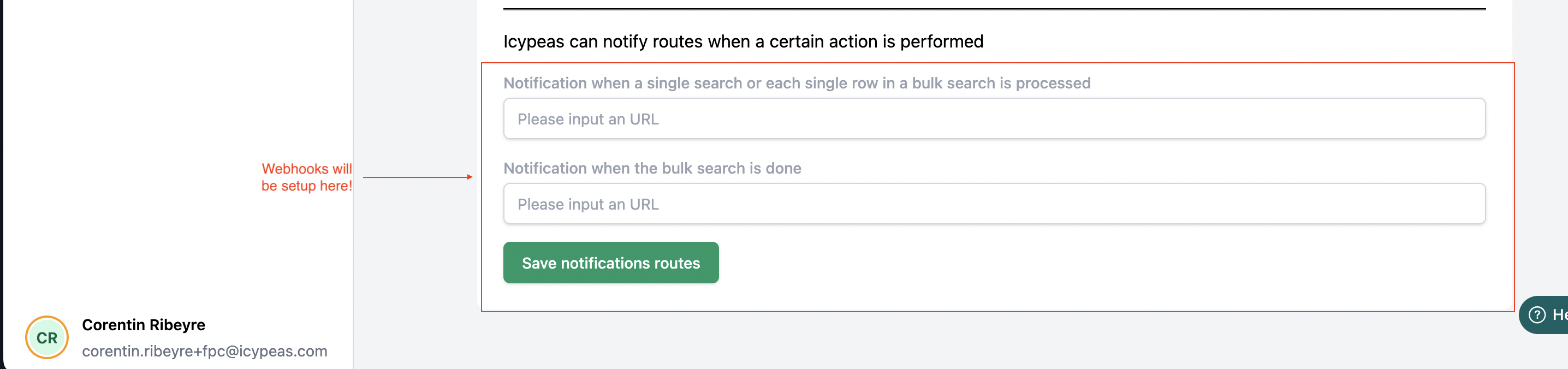
To turn a notification off, empty its field and save.
For one search: in the request
Pass your URL with the search. It's used for that search only, on top of the ones set in the app.
| Endpoint | Field |
|---|---|
/email-search, /email-verification, /domain-search | custom.webhookUrl |
/bulk-search | custom.webhookUrlItem (each row) and custom.webhookUrlBulkDone (end) |
{
  "email": "pierre.landoin@icypeas.com",
  "custom": {
    "webhookUrl": "https://example.com/icypeas/result",
    "externalId": "crm-1042"
  }
}
Receive them
- Icypeas sends a POST request with a JSON body.
- Answer with an HTTP 200 status.
- The URL must be reachable from the internet. Webhook URLs from Zapier (Catch Hook), Make (Custom webhook) or n8n (Webhook node) work out of the box.
Every call has this shape:
{
  "signature": "HMAC-SHA1 signature",
  "timestamp": "2026-03-01T04:40:20Z",
  "data": { "…": "the result or the statistics" }
}
Check that a call really comes from Icypeas (optional)
Anyone who knows your webhook URL could call it. To be sure a call comes from Icypeas, recompute the signature with your API secret and compare:
- Take the path of your webhook URL, for example
/icypeas/resultforhttps://example.com/icypeas/result. - Append the
timestampfrom the body. - Lower-case the result.
- Compute its HMAC-SHA1 with your API secret, in hexadecimal.
- It must equal
signature.
Node.js / Express
import crypto from "node:crypto";
import express from "express";

const app = express();
app.use(express.json({ limit: "50mb" }));

app.post("/icypeas/result", (req, res) => {
  const { signature, timestamp, data } = req.body;
  const payload = `${req.path}${timestamp}`.toLowerCase();
  const expected = crypto
    .createHmac("sha1", process.env.ICYPEAS_API_SECRET)
    .update(payload)
    .digest("hex");

  if (expected !== signature) return res.sendStatus(401);

  console.log(data.results?.emails, data.userData?.externalId);
  res.sendStatus(200);
});

app.listen(3000);
Large bulk searches
If you use includeResultsInWebhook on a bulk search of more than 1,000 rows, make sure your server accepts large request bodies (see limit above).