Get your API key
Your API key identifies your Icypeas account. Every request you send must include it. It's free and takes 30 seconds to get.
Create an Icypeas account
If you don't have one yet, sign up here. Every account can use the API.
Open the API page
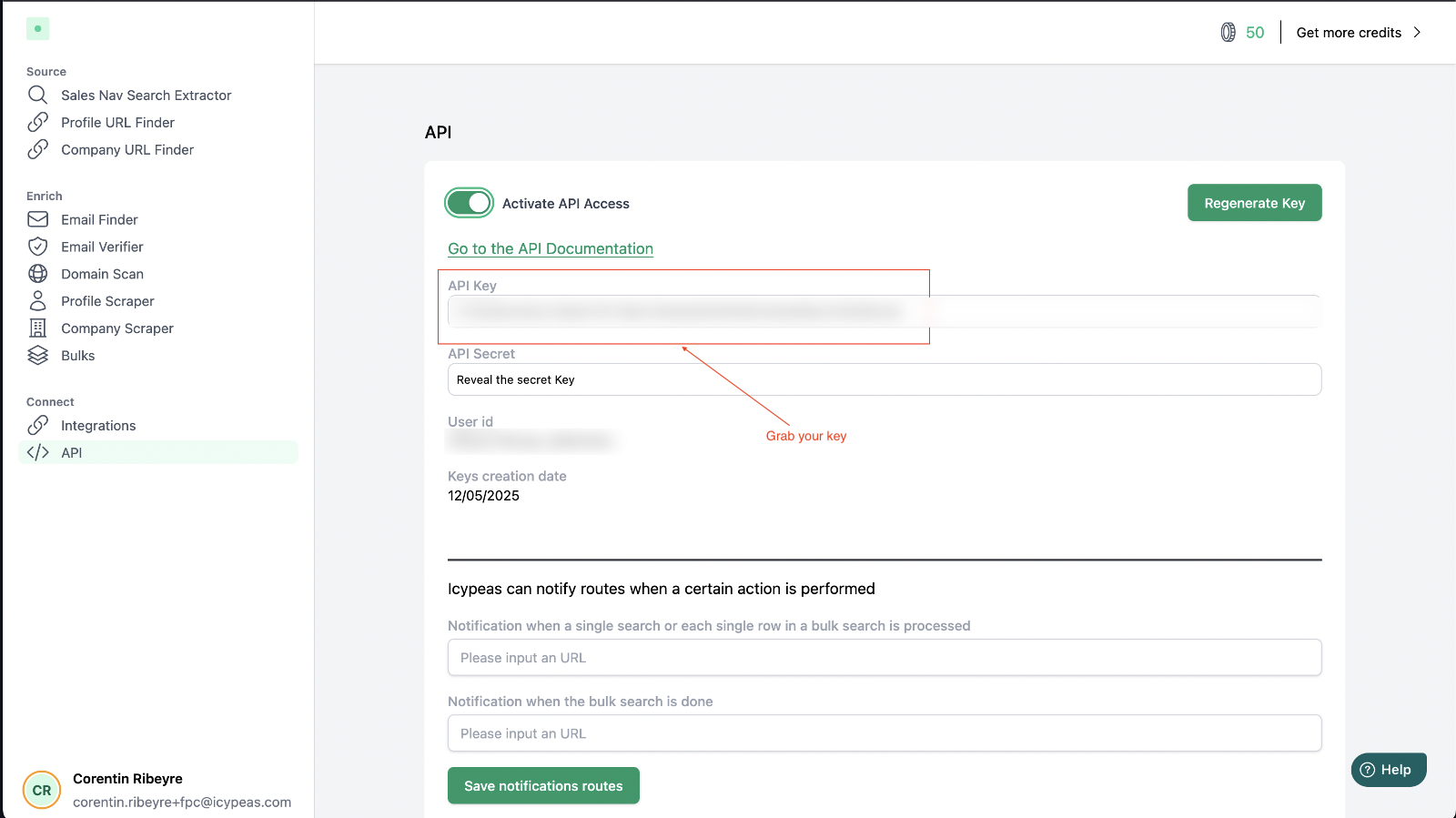
In the app, click API at the bottom of the left menu, under Connect. Or go straight to app.icypeas.com/bo/api.

Activate API access
Switch on Activate API Access.

Copy your key
Your key appears in the API Key field. Copy it and keep it somewhere safe, like a password manager.
What's on this page
| Field | What it's for |
|---|---|
| API Key | Goes in the Authorization header of every request. This is the only thing you need to get started. |
| API Secret | Only needed if you choose to sign your requests or to check that webhook calls really come from Icypeas. |
| User id | Your account id. Rarely needed, also returned by the subscription endpoint. |
| Notification URLs | Where Icypeas sends webhooks when a search is done. |
Keep your key safe
Treat your API key like a password
Anyone who has it can use your credits.
- Never paste it in a public place (GitHub, forums, screenshots, front-end JavaScript).
- If it leaks, click Regenerate Key on the API page. The old key stops working immediately.
Next step: find your first email.